
Download Koteshen – Automated Invoicing & Billing Software
Overview: Why Koteshen Is Changing the Way Businesses Handle Billing
Koteshen is a web‑based financial tool built from the ground up to eliminate the headaches associated with traditional invoicing and billing. In today’s fast‑paced business environment, small startups and large enterprises alike need a reliable, secure, and intuitive solution that can keep up with the volume of transactions while delivering professional‑grade documents in seconds. Koteshen meets those expectations by offering a subscription‑based platform that automates the entire lifecycle of an invoice—from the moment an estimate is created, through conversion, delivery, and finally, payment confirmation. The application also centralizes receipt management, provides seamless Excel export for deep‑dive reporting, and notifies users of invoice status changes, ensuring cash flow remains transparent and predictable.
Beyond the core invoicing capabilities, Koteshen emphasizes security and compliance. All data is stored on encrypted servers with regular backups, and the platform complies with major data‑privacy regulations such as GDPR and CCPA, giving peace of mind to businesses that handle sensitive financial information. The intuitive dashboard is accessible from any modern browser, eliminating the need for heavy desktop installations and allowing teams to collaborate in real time. With automatic reminders, customizable templates, and multi‑currency support, Koteshen positions itself as a comprehensive billing ecosystem that reduces manual effort, cuts down late payments, and ultimately improves the bottom line. Whether you’re a freelancer looking to send polished quotes or a mid‑size company aiming to streamline accounts receivable, Koteshen’s tiered pricing model scales with your needs, making it a cost‑effective choice for any budget.
Key Features & Benefits That Set Koteshen Apart
- Instant Estimate‑to‑Invoice Conversion – Create a professional estimate and transform it into a binding invoice with a single click, saving time and eliminating duplicate data entry.
- Automated Status Notifications – Real‑time alerts inform you when an invoice is viewed, overdue, or paid, helping you stay on top of cash flow without constant manual checks.
- Customizable Invoice Templates – Choose from a library of modern designs or upload your own branding assets to ensure every invoice reflects your company’s identity.
- Excel Export & Advanced Reporting – Export transaction data to Excel for detailed analysis, tax preparation, or integration with other accounting tools.
- Centralized Receipt Management – Upload and organize receipts in a single, searchable repository, simplifying audit trails and expense tracking.
- Multi‑Currency & Tax Settings – Support for global transactions with automatic currency conversion and configurable tax rules for different jurisdictions.
- Secure Cloud Hosting – End‑to‑end encryption, regular backups, and compliance with GDPR and CCPA keep your financial data safe.
- Tier‑Based Pricing – Flexible subscription plans that grow with your business, from a free starter tier to enterprise‑grade packages.
Each of these features is designed to tackle a specific pain point that businesses encounter daily. For instance, the instant conversion tool eliminates the risk of mismatched numbers between estimates and invoices, which can lead to disputes or delayed payments. Automated notifications act as gentle nudges, reducing the need for follow‑up emails and phone calls. The ability to export data to Excel means you’re not locked into a proprietary format; you can integrate Koteshen’s output with your existing ERP or accounting software, ensuring a smooth workflow across departments.
Moreover, the receipt management hub turns a chaotic pile of PDFs and photos into an organized library that can be accessed by any authorized team member. This centralization is especially valuable during tax season or when preparing for audits, as it provides a clear audit trail without the need for manual cross‑referencing. Overall, Koteshen’s feature set not only automates repetitive tasks but also enhances financial visibility, allowing decision‑makers to act on real‑time data rather than outdated spreadsheets.
Installation, Usage, and Compatibility Across Devices
Getting Started – Simple Sign‑Up and Setup
Because Koteshen is a cloud‑native application, there is no traditional “installation” process. Users begin by visiting the official website, clicking the “Start Free Trial” button, and completing a brief registration form that captures basic company information. After confirming the email address, you are redirected to the onboarding wizard, which walks you through setting up your business profile, uploading your logo, and configuring default tax and currency settings. The wizard also prompts you to import any existing client lists via CSV, ensuring a seamless transition from legacy invoicing tools.
Daily Workflow – From Estimate to Payment
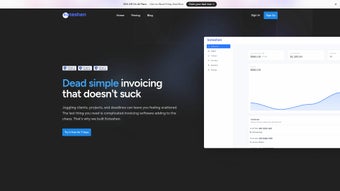
Once your account is set up, the dashboard presents three primary tabs: Estimates, Invoices, and Receipts. To create an estimate, click “New Estimate,” fill in client details, add line items, and select a template. When the client approves the estimate, you simply click “Convert to Invoice,” and the system automatically carries over all line items, taxes, and discounts. The invoice is then generated, saved, and can be sent directly via email or a secure shareable link. As soon as the client opens the invoice, Koteshen records a “viewed” status; if the due date passes without payment, an automated reminder is dispatched according to your preset schedule.
Compatibility – Work Anywhere, Anytime
Koteshen is built on responsive web technologies, meaning it runs flawlessly on any modern browser—including Chrome, Firefox, Safari, and Edge—on Windows, macOS, Linux, as well as mobile platforms such as Android and iOS. The platform also offers native companion apps for Android and iOS, giving you the ability to create estimates, approve invoices, and capture receipts on the go. Because all data resides in the cloud, changes made on a desktop instantly sync to mobile devices, ensuring you always have the latest information at your fingertips.
Security is reinforced with two‑factor authentication (2FA) and role‑based access controls, allowing administrators to grant granular permissions (e.g., view‑only for accountants, full edit rights for sales staff). This flexibility makes Koteshen suitable for solo entrepreneurs, small teams, and large enterprises with complex hierarchical structures. Whether you are in a coffee shop, a corporate office, or traveling abroad, Koteshen’s robust compatibility guarantees that billing operations never miss a beat.
Conclusion: Expert Review, Pros & Cons, and Frequently Asked Questions
Pros
- Fully automated estimate‑to‑invoice workflow eliminates duplicate data entry.
- Real‑time notifications keep you informed about invoice status without manual tracking.
- Customizable templates and branding ensure professional presentation.
- Excel export enables deep financial analysis and seamless integration with other tools.
- Centralized receipt storage simplifies audit preparation and expense tracking.
- Responsive design works on Windows, macOS, Android, and iOS without additional software.
- Tiered pricing makes it affordable for startups while scaling for large enterprises.
Cons
- Requires an internet connection; offline mode is limited to viewing cached data.
- Advanced accounting features (e.g., full double‑entry bookkeeping) are not built‑in and may need third‑party integration.
- Some users report a learning curve when customizing templates for the first time.
- Export formats are currently limited to CSV/Excel; direct PDF batch export is a paid add‑on.
FAQ – Your Billing Questions Answered
Can I try Koteshen before committing to a paid plan?
Yes, Koteshen offers a 14‑day free trial with full access to all core features. No credit card is required to start the trial.
Is my data safe on Koteshen’s cloud servers?
Koteshen employs AES‑256 encryption, regular automated backups, and complies with GDPR and CCPA standards. Two‑factor authentication is also available for added security.
Can I integrate Koteshen with my existing accounting software?
While Koteshen does not have built‑in double‑entry accounting, you can export invoices and receipts to Excel or CSV and import them into popular tools like QuickBooks, Xero, or Sage.
Does Koteshen support multiple currencies and tax rules?
Yes, the platform allows you to set default currencies per client, apply automatic exchange rates, and configure tax percentages for different regions.
What kind of customer support does Koteshen provide?
Koteshen offers 24/7 email support, live chat during business hours, and a comprehensive knowledge base with video tutorials and step‑by‑step guides.
Expert Review
Koteshen delivers on its promise to streamline billing workflows. The intuitive UI, robust automation, and cross‑platform compatibility make it a compelling choice for businesses looking to reduce manual invoicing effort. While the lack of deep accounting integration may require supplemental tools for some enterprises, the overall value‑to‑price ratio remains strong, especially for small‑to‑mid‑size firms seeking a secure, cloud‑first solution. The combination of real‑time alerts, customizable branding, and multi‑currency support ensures that both domestic and international transactions are handled with equal ease. For teams that need to collaborate on financial documents from multiple locations, Koteshen’s role‑based permissions and two‑factor authentication provide the right balance of accessibility and security.
If you’re ready to eliminate late payments, gain real‑time visibility into your accounts receivable, and present polished, brand‑consistent invoices to every client, download Koteshen now and start your free trial. Experience the efficiency of a modern billing suite that grows with your business, and watch your cash flow become clearer, faster, and more predictable.



.png)



